
You’ve just landed in another country. You need internet to check Google Maps, message to your family on WhatsApp, Cab/Taxi booking, verify your hotel reservation, or translating app usage.
Suddenly, you face a classic modern travel choice: Do you hunt down a local SIM card, buy an eSIM, or simply turn on mobile roaming? Every traveler will face this scenario at least once a life.
Every option will connect you to the internet, but they work in totally different ways, cost different amounts, and offer different levels of convenience. Choosing the wrong option can waste hours waiting in airport lines. It can lead to a huge phone bill when you get home. You may be stuck with no signal when you need it most.
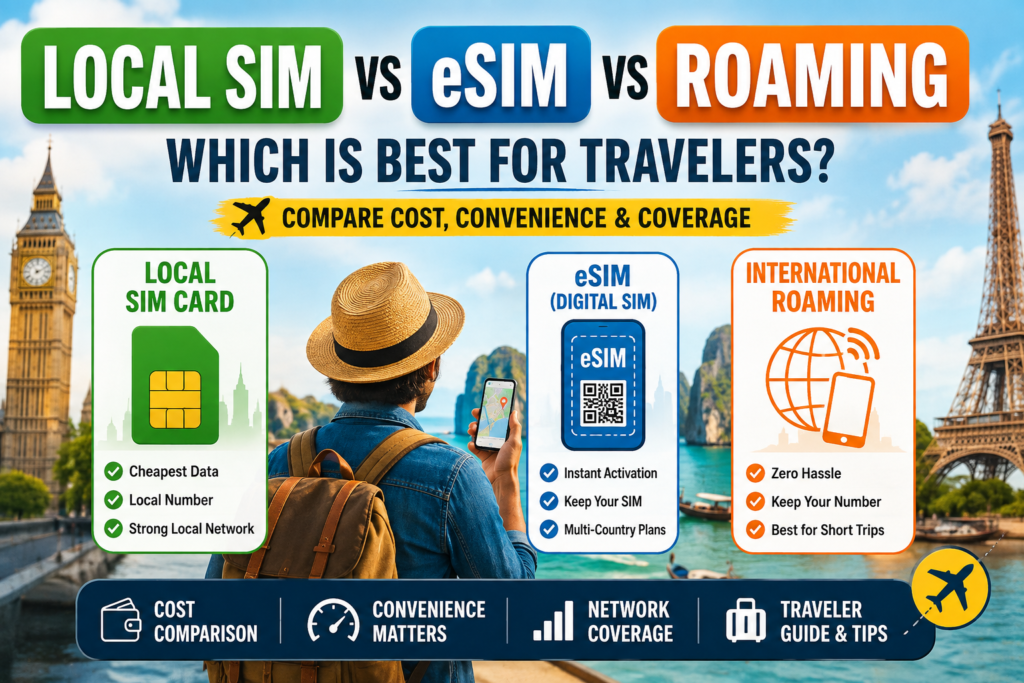
We can see all three options here —local SIM vs eSIM vs roaming
The Local Physical SIM Card
A physical local SIM card is a tiny plastic chip you physically insert into your phone’s SIM tray. When you buy net in your destination country, you are connecting directly to a home network operator in that region (like Vodafone in Europe, Telstra in Australia, or AIS in Thailand).
How Travelers Get One
You usually buy a local SIM card for tourists after landing. You can find seller kiosks right at the airport arrival terminal, in phone stores on city streets, or inside local convenience shops (like 7-Eleven). In most countries, you will need to present your passport so the seller can register the line under your name.
The Advantages of local sim card
Great Value Data: Local rates are usually the cheapest option per GB, especially if you are longer stays or heavy data users.
Phone Number : You can get a local phone number, making it easy to receive calls, book local restaurants/caps.
Strong Local network speeds: You get native network priority and fast speeds directly from local towers.
The Disadvantages for Local sim card
Airport Hassle & Lines: Buying sim card at the airport often means waiting in long queues after a long flight and long standing immigration.
Registration Process : This the major problem, Language barriers, strict passport registration laws, or store opening hours can complicate the process.
Risk of Losing Your Home SIM: You have to take out your original physical SIM card and store it safely. If you lose that tiny piece of plastic, returning home will be a headache.
The eSIM (Digital SIM)
An eSIM (embedded SIM) is a tiny digital chip built right into your phone’s hardware. Instead of physically plastic chips, you can download a digital QR Code profile from a travel eSIM provider (like lycamobile, Airalo, Holafly, Nomad, or Maya Mobile, ) to connect your phone to local networks.
How to Buy and Activate One
You can browse, purchase, and install a travel eSIM online before you even pack your bags. You install it by scanning a QR code or activating it directly through a travel app. Once set up, the data plan activates as soon as your phone connects to a supported foreign network after landing.
The Advantages of eSIM
Instant Internet Upon Landing: Connect to the internet the moment your plane touches land and immediate activation and no need to waiting in airport lines.
Personal SIM : You can keep your main physical SIM card in your phone to receive important calls, SMS, and two-factor banking opts.
Multi-Country Travel: You can switch local plans digitally without swapping physical cards.
The Disadvantages of e sim
Device Dependency: Requires an eSIM-compatible and carrier-unlocked smartphone. Old phone will not support the e sim
Data-only eSIMs: Most providers offer data only. This means you cannot make regular phone calls or send SMS.
Higher Cost: In Some counties e sim slightly more expensive per GB than buying a standard local SIM in city shops.
What to Check Before Buying an eSIM?
Device Compatibility: Check your phone settings to verify your phone supports eSIM technology.
Hotspot Rules: If you need to share internet with to your laptop, check if the eSIM plan allows personal hotspot sharing. Few network provider wont allow the personal hotshot options
Validity & Coverage: Pay attention to how many days the plan lasts once activated and which local networks it connects to.
International Roaming
International roaming happens when you use your primary home phone plan in another country. Your home operator partners with networks around the world to keep your phone connected without changing your SIM card or downloading new profiles.
Why It’s Convenient & When Costs Creep Up
Roaming is zero-effort. You turn on “Data Roaming” in your settings, and everything works seamlessly using your regular number. However, standard pay-as-you-go roaming rates can be insanely expensive. Catching up on social media videos without an international travel pass can quickly lead to hundreds of dollars in unexpected charges.
✓ When Roaming Is the Best Choice
Fixed Daily Travel Passes: Many operators offer daily flat-rate roaming passes ($5–$10/day) that let you use your home plan’s data, calls, and texts abroad.
Short Business Trips: Perfect for 1- or 2-day business trips where convenience is priority #1.
Seamless opts & Calls: Crucial if you must remain reachable at your normal phone number at all times for urgent business or family calls.
Local SIM vs eSIM vs Roaming FAQ’s
FAQ 1: Visiting one country for 5 days on holiday
Recommended Choice: Travel eSIM or Roaming Daily Pass
When traveling for just 5 days, wasting 1–2 hours at the airport or local shop to save a couple of dollars. isn’t worth it. A quick 3GB–5GB travel eSIM or a daily carrier pass gets you instant internet so you can start enjoying your vacation right away. Make sure the roaming data cost before activate the add-on.
FAQ 2: Backpacking across 3–4 European countries
Recommended Choice: Regional eSIM or Regional European SIM
Swapping physical SIM cards every time you cross a border is very hard. So you can buy a European travel eSIM (Like Lycamobile e sim) connects you across multiple borders in Europe under a single plan without having to register new sim in every country.
FAQ 3: A business traveler
Recommended Choice: Roaming Package (or Dual-SIM with Travel eSIM)
If clients, colleagues, or bank login verification (opts) use your primary number, roaming via a carrier daily or weekly pass is best option. Alternatively, use another SIM to for mobile data through the travel.
FAQ 4: backpacker staying 1 month in one place
Recommended Choice: Local Physical SIM Card
For a full month in one destination (e.g., Thailand or Mexico), local physical sim offer huge data bundles at lowest prices, which is essential for remote work or navigating long trips on a budget.
FAQ 5: Someone who wants internet the second they touch down
Recommended Choice: Travel eSIM
If landing without connectivity stresses you out, buy an eSIM before leaving home. Activate the e sim once you land the destination, but activating e sim need internet, you can use your roaming data or airport Wifi.
FAQ 6: Traveling somewhere with complex local registration laws
Recommended Choice: Travel eSIM
In countries where tourist SIM registration involves long paperwork, mandatory photo scans, or language hurdles, setting up an eSIM beforehand avoids the bureaucratic headache entirely. Some countries you have to activate the e sim in local shops
Which Option Should You Choose?
Still on the confusion? Use below checklist to select the best SIM for traveling abroad:
Choose a Local SIM if you’re going to staying in the country for more than two weeks, You must need more data for cheap. So buy the local sim card, But most of the countries registration is mandatory.
Choose an eSIM if: Your phone is support for eSIM and you are planning to visiting multiple countries, price convenience, and want immediate connectivity upon landing. Activating e sim you need Internet
Choose Roaming if: You are planning to short trip (1–3 days), your carrier offers an affordable daily travel add-on. Make sure the roaming prices
Travel Checklist for Mobile
- Verify your phone is unlocked: Locked phones cannot use third-party local sim or travel eSIMs. Contact your home carrier to unlock it before departing.
- Check eSIM support: Make sure your phone model supports eSIM. Download the e sim QR code before fly.
- Keep your primary SIM active for opts: If you are using dual SIM (eSIM + primary SIM), set your secondary eSIM for “Mobile Data” and your primary SIM for calls and opts.
- Disable primary SIM mobile data: Make sure your mobile data option is turned OFF before your flight, this will help to Avoid accidental background data roaming charges.
- Double-check data limits & tethering: Confirm your plan allow the hotspot sharing to connect your laptop or tablet. In some countries Hotspot not allowed from your mobile data.
- Download offline maps: Download offline Google Maps for your destination before boarding your flight as a safety backup.